TypeNod
Translate as you type, locally on your Mac
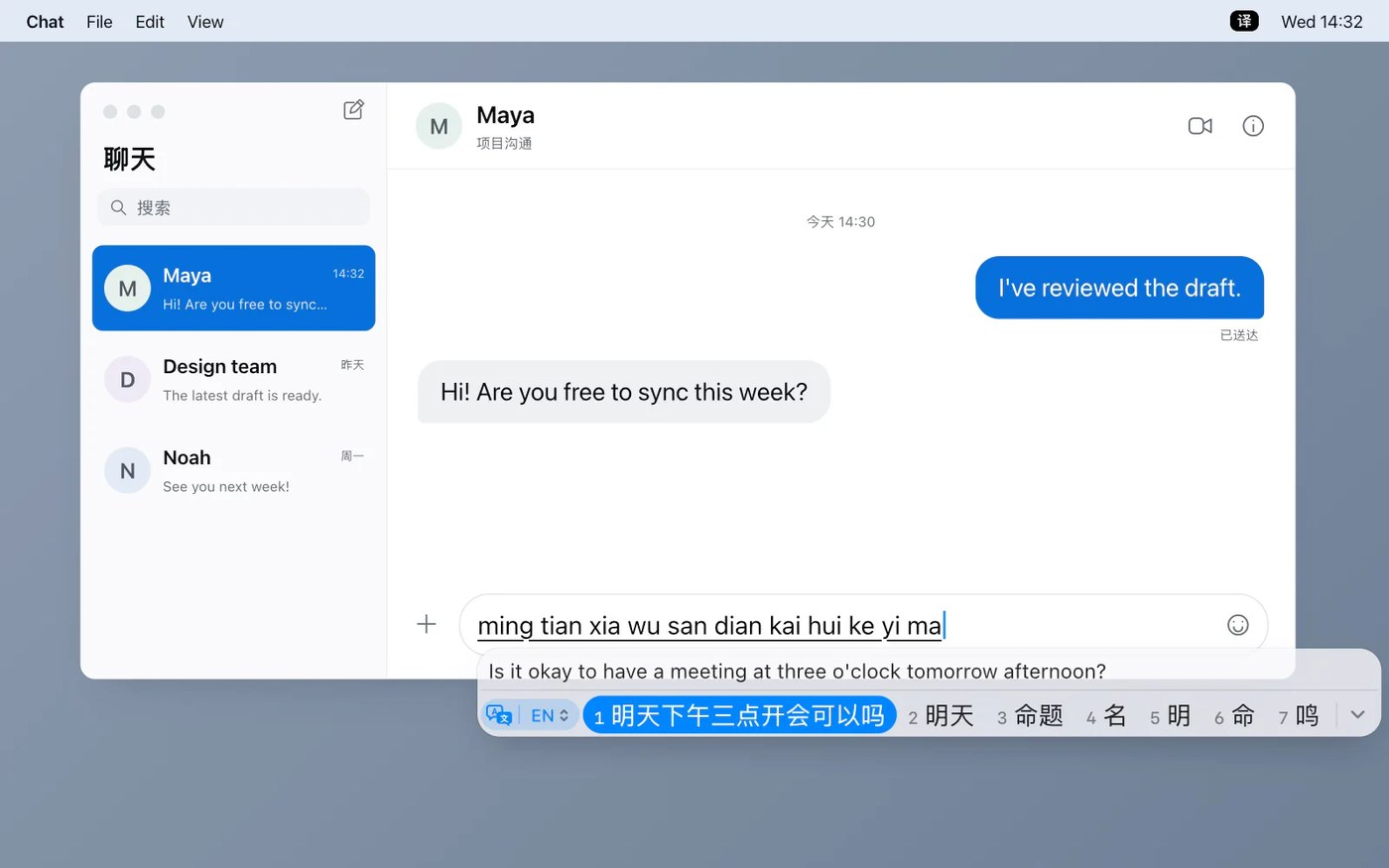
TypeNod shows a translation preview while you type in standard Mac text fields; press Space or Return to insert it. You can type in English, Spanish, French or Simplified Chinese Pinyin and translate into languages supported by macOS on-device translation. Tab switches between original and translated output, and the language code on the panel changes the target language.
Translation runs through Apple’s on-device features, with no cloud service. What you type is kept only while you type it; only the Pinyin dictionary remembers chosen words, locally. The clipboard is never read or written. Requires macOS 26.0 or later (sentence refinement needs 26.4), Apple silicon or Intel. Once translation resources are downloaded, typing, translation and license activation work offline. No free trial at launch; full refund within 30 days.
Why no subscription? The lifetime Mac license is a one-time US$9.90, tax included, with future Mac updates and no renewal fees. One license covers one person on every Mac they use; the iPhone version is not included.
Keywords: translation · input method · pinyin · macOS · offline · no subscription · one-time purchase
Report a subscription change
Now subscription-only — no full one-time purchase anymore? Help keep the directory current: