DeskCommit
Set up Mac displays from your keyboard
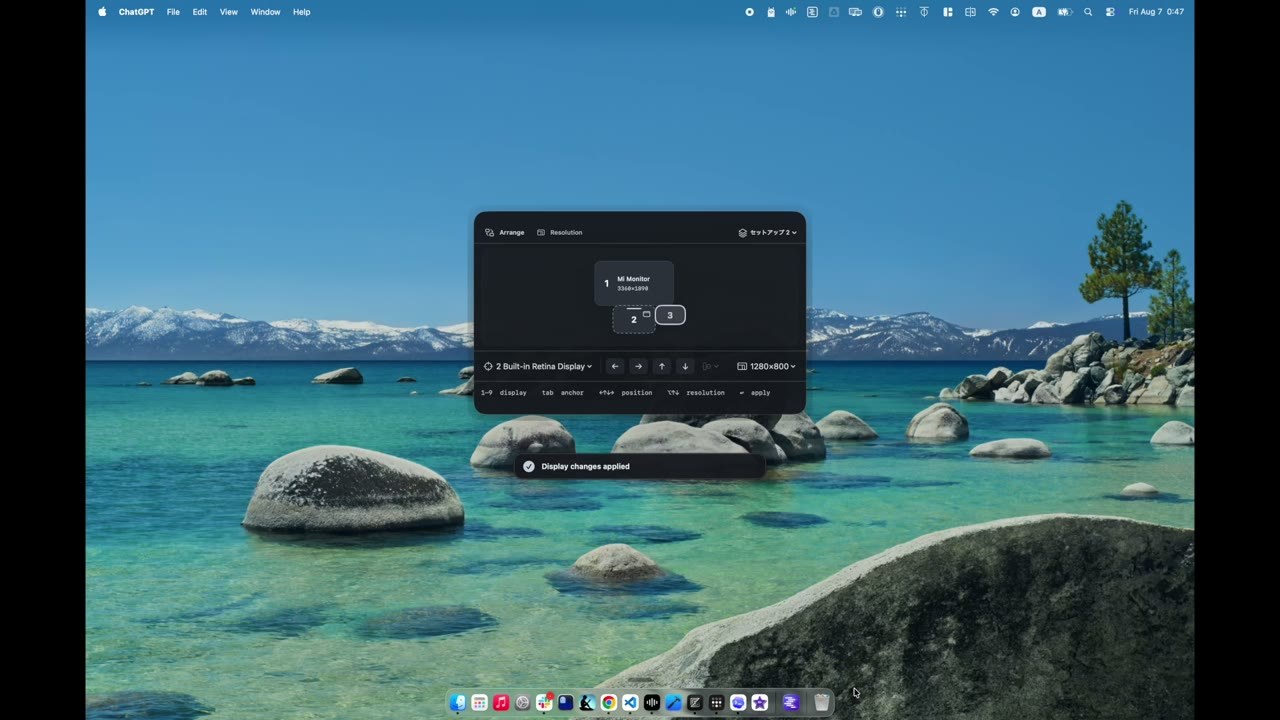
DeskCommit is a macOS menu bar app for display settings. A shortcut you choose opens one palette: pick a display, place it left, right, above or below another with the arrow keys, align edges or centers with Shift–Arrow, then press Return. Resolution, refresh rate and the Main display (press M) live in the same palette.
Arrangement, resolution, refresh rate and main display can be saved as a setup and restored manually when the matching displays are connected — this is not automatic. Low-resolution modes revert after 15 seconds, and applied changes can be undone. Requires macOS 13 or later, Apple silicon or Intel. Purchase and first activation need internet; afterwards it works offline for up to 30 days after the last verification.
Why no subscription? US$4.99 once, for up to two Macs, with no recurring charge. Updates for the same Personal license need no further license fee, though no minimum period for future updates, macOS compatibility or support is promised. No trial, but a 7-day money-back guarantee.
Keywords: display arrangement · resolution · refresh rate · keyboard shortcut · menu bar · macOS · no subscription · one-time purchase
Report a subscription change
Now subscription-only — no full one-time purchase anymore? Help keep the directory current: